There is always someoneto beat.
Even when that someone is you.
ChronoDash records every lap with pro-grade precision, and shows you exactly where the tenths you are missing have gone.
A day at the track
Your track day, start to finish
It takes up almost no space, wires to the battery, and the app is a free download. There is a manual, but you will probably never open it. Here is what actually happens, hour by hour.
- 07:50
You fit the module.
Velcro wherever suits you — under the tail, on top of it, or on the handlebar — and two wires to the battery. Two minutes, and no extra screen to look at.
- 10:15
You leave the pits and ride.
ChronoDash records everything on its own: times, lines, lean angles, speed. You just enjoy the ride.
- 10:38
You come in and connect.
You are on the leaderboard before your helmet is off. You know how far ahead of Marco you are, and how much you need to beat your own time at Misano.
- 11:05
A break, in the paddock.
You overlay your line on the rider who beat you, or on your own best lap, and see which corner ate those three tenths. Then you put the helmet back on and try again.
Real-time lap times shown on your motorcycle's original dashboard are in development and will ship in beta after launch.
Your progress
Your first rival is you.
You do not need anyone else on track to improve. ChronoDash records every lap in detail and puts your best time next to the one you just set, corner by corner: you see straight away where you gained and where you threw tenths away.
Telemetry for every lap
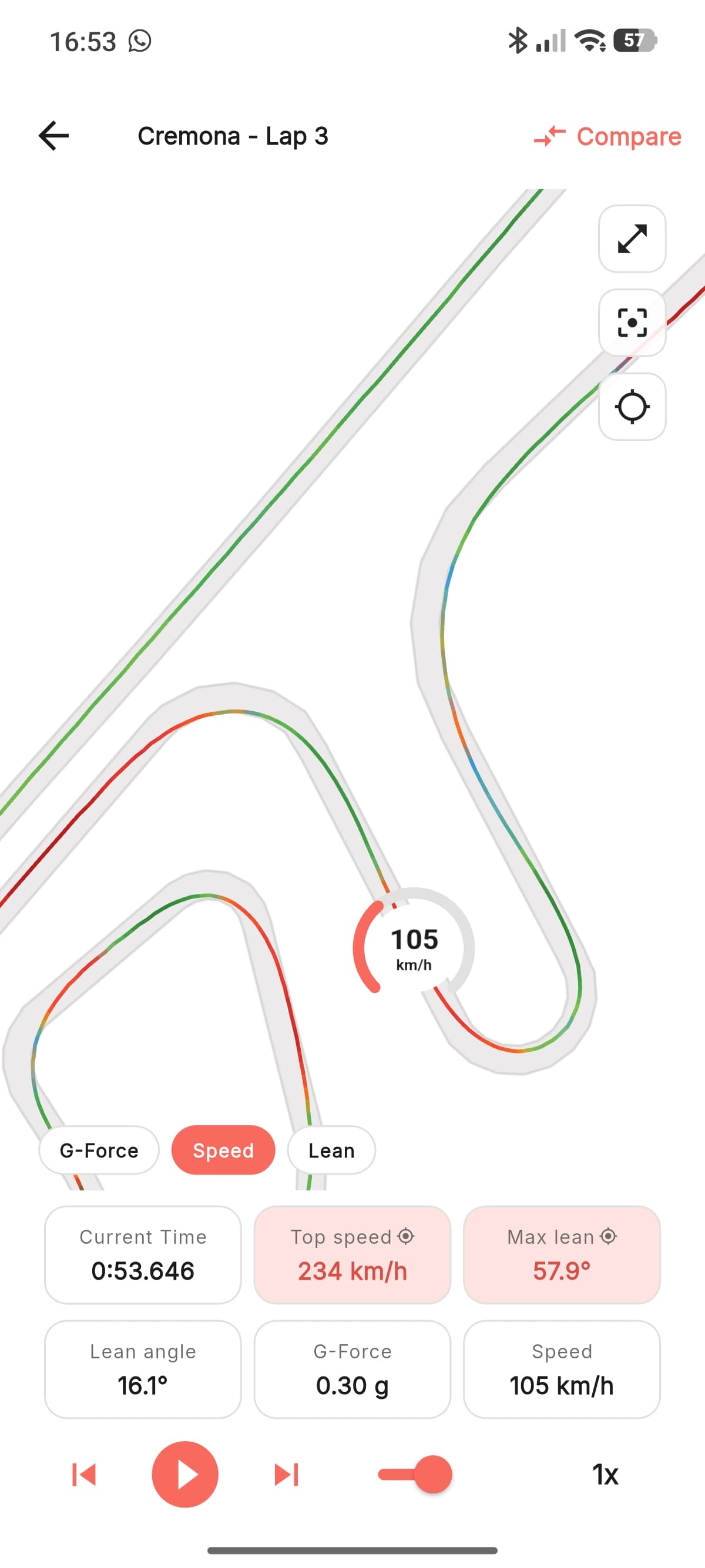
Speed, lean angle, acceleration and braking along the whole circuit. Not a summary: the entire corner, point by point.
Lap against lap
Overlay two laps and read the gap corner by corner, each one called by its name. Where the line separates is what to work on next time out.
Times that keep dropping
Your best time on every track, day after day. It is the proof you are improving even when the feeling says otherwise.
The board
A record broken, a new track day, a time shaved: your progress and your friends' all scroll in the same place.
Today vs your record · Mugello
- Main straight
- −0.104
- San Donato
- +0.287
- Arrabbiata 2
- −0.061
- Bucine
- −0.190
You gain everywhere except San Donato. That is where your next tenth is.
Ideal time · Mugello
Ideal time
1:57.812
Best lap
1:58.947
A second and a tenth you have already ridden. Just never in the same lap.
The why, corner by corner · Arrabbiata 2
- Braking point
- 6 m later
- Throttle on
- 8 m earlier
- Peak lean
- −3.0°
- Minimum speed
- +4 km/h
Less lean and more speed at once, because you run 1.2 m wider: −0.214 on the split.
Ideal time
Every lap timer tells you where you lost. We tell you why.
The ideal time is the lap you would have set by stitching your best pieces together. Everyone shows you that. ChronoDash adds the only part that actually helps: corner by corner, what you did differently on the good one. Not a number to look at, an instruction to try next session.
The braking point
At San Donato your best split comes from braking six metres later. Six metres, not "a bit later".
The throttle
Out of Arrabbiata 2 you get on the gas eight metres earlier. That is where the tenth you find at the end of the straight is born.
The lean you do not need
At Bucine you are faster with three degrees less lean, because you run 1.2 m wider. That is the right way to gain time, not the risky one.
Corners, not sectors
We do not say "sector 2". We say "Arrabbiata 2", or "turn 8", using the circuit's official numbering. You know exactly where to go and work.
Ideal time is part of ChronoDash Pro: included for the first 3 months with the module.
Why our ideal time is stricter than theirs
The others add up splits cut wherever it happened to fall, often mid-corner: the braking ends up in one sector and the corner speed in the next, and the ideal lap that comes out is more optimistic than the real one. ChronoDash cuts at the end of the straight, where the braking belongs to the corner you are braking for. The number you read is a lap you can actually put together.
Leaderboards
Your 1:52 finally means something.
Every valid lap goes straight onto your track's leaderboard. See it overall, by bike class, by model — the people on exactly your bike — friends only, or that day only. So you find out whether that time you were happy with was actually good, and who is going faster on the bike you have in the garage.
And if nobody else is on your track yet?
The leaderboard still starts, with one row: yours. Your first rival is you from the last session, and that one is always there.
Automatic checks
No made-up time gets on the board.
Laps come from the module and cannot be typed in by hand. The system checks that the GPS trace matches the circuit, that every corner was actually ridden, and that speed and lean are physically possible. Anything that fails stays in your history, off the leaderboard.
- 146Marco D.Yamaha R61:51.402—
- 221Luca B.Kawasaki ZX-6R1:51.918+0.516
- 358YouYamaha R61:52.147+0.745
- 47Andrea F.Honda CBR600RR1:52.630+1.228
Seven tenths off Marco. Three of them in turn 8.
Daily leaderboard: add your number.
On the daily board you can enter the number you are running that day. So when someone on your exact bike is going faster, they are not just a name on a screen: you know who they are, you spot them on track, and at the end of the session you go and ask them how.
The daily leaderboard is part of ChronoDash Pro: included for the first 3 months with the module.
Challenge of the day · Misano
You
1:52.147
Andrea F.
1:52.630
- Turn 4
- +0.081
- Turn 10
- −0.398
- Main straight
- +0.126
- Turn 14
- −0.292
You win by 483 thousandths, and you make all of them in two corners.
Challenges
The challenge doesn't end when you hit the pits.
Pick a track and a day, call up one friend or several, and the challenge is on. ChronoDash keeps score while you are still out there, tells you when someone passes you and calls the winner when the track closes. Then you meet again next time out.
Friends, not groups to manage
Every track has a Friends leaderboard, all-time, alongside the overall one. And you challenge them straight from the app.
One track, one day
The challenge lives inside the track day: same circuit, same date. Fastest lap before the track closes wins, and tomorrow it starts from zero again.
Alert when you drop
You know the moment a friend passes you, while you are still in the pits. That is usually when the helmet goes back on.
Shareable result
Every finished challenge becomes an image to drop in the group chat. That is how the community grows.
Challenges are part of ChronoDash Pro: included for the first 3 months with the module.
Rider profile
Everything you have done on track, in one place.
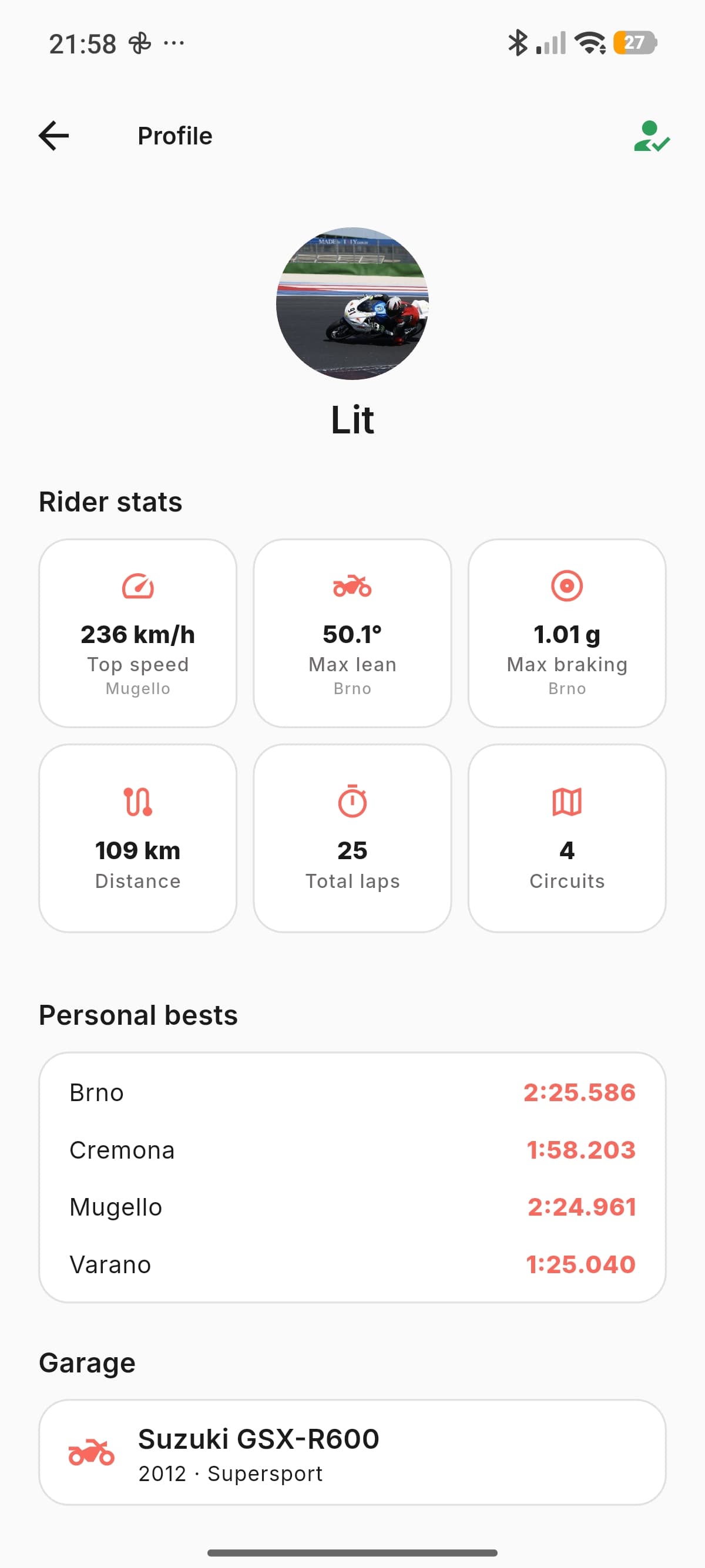
Your best times track by track, your progress over time, the bikes you have ridden, the tracks you have visited, the kilometres covered. Plus your top speed record and your lean angle record: two numbers every rider wants to know and that until now could only be guessed at. ChronoDash keeps them, with the track and the date.
- Top speed record
- 271 km/hMugello · 14 June
- Lean angle record
- 54.2°Misano · 3 August
9 days · 4 tracks · 1,312 km · 6 personal records
Then you open a friend's profile and see theirs.
Precision
Numbers are only worth something if they are real.
If the time swings three tenths every lap you cannot tell whether you improved, or whether that new line works. That is why ChronoDash does not rely on your phone's GPS: dedicated hardware, the same yardstick session after session.
Twenty-five fixes per second
At 200 km/h that is one measurement every two metres. That's the difference between knowing your lap time and guessing at it: with a phone GPS the same lap can be worth three tenths more or less.
Lean angle measured, not guessed
Dedicated accelerometer and gyroscope for lean angle, acceleration and braking: not numbers inferred from GPS. And if the module is mounted crooked it notices, tells you, and keeps that record off the lean leaderboard. We also know when we are measuring it badly.
It finds the start line on its own
No point to mark by hand, no lap lost because the line was ten metres off. You show up, you ride, it knows the circuit. And if yours is not one of the 80, you add it: draw the finish line on the map in the app and send it to the module.
See the supported tracksIt fits in the palm of your hand
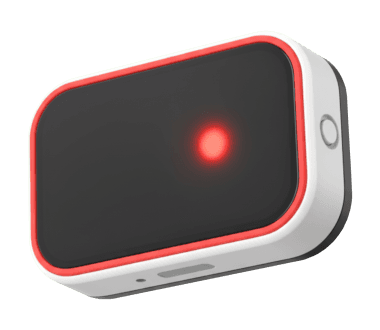
Velcro it — included in the box — wherever suits you: under or on top of the tail, or on the handlebar. Then two wires to the bike battery and you are done. No custom brackets, no drilling: peel it off and move it to another bike in a minute.
Fifty riders have already improved their personal best.
ChronoDash is in closed beta. These are today's numbers, and the words of the people using it on track.
- riders in beta
- 50+
- laps on the board
- 1,000+
- tracks mapped
- 80
- records broken this week
- 12
My group stopped arguing about who is fastest: now there is a leaderboard. I found out I was losing three tenths in turn 8 to someone on my exact bike. I took them back in a single day.
I use it with my students. Seeing your own time next to everyone else's does more than an hour of theory: they understand straight away that the problem is not bravery, it is the line.
Luca and I restart the challenge every track day, and have done since April. We are two tenths apart and every time one of us improves the other gets a notification, while we are both still in the pits. I booked two extra track days just because of it.
Want to join the beta?
Places are limited because we follow every beta tester personally. If you ride on track regularly, tell us where.
The best of both worlds.
Phone apps are cheap and already in your pocket, but the times swing three tenths a lap. Pro systems measure everything, and cost more than a season of tyres. ChronoDash takes the precision of the one and the lightness of the other.
| Features | Smartphone apps€0-30 | ChronoDash€249 | Pro systems€450-800+ |
|---|---|---|---|
| Community | |||
| Leaderboards by track, class and bike model | |||
| Daily leaderboard and challenges with friends * | |||
| Rider profile with personal records | |||
| Ideal time explained corner by corner * | |||
| Lap and line comparison * | |||
| Hardware and installation | |||
| High frequency GPS | |||
| Dedicated IMU sensors | |||
| Plug & play installation | |||
| Uses the bike's original dashboard | |||
| Custom tracks you draw yourself | |||
| Affordable price | |||
Smartphone apps
€0-30
Community
- Leaderboards by track, class and bike model
- Daily leaderboard and challenges with friends *
- Rider profile with personal records
- Ideal time explained corner by corner *
- Lap and line comparison *
Hardware and installation
- High frequency GPS
- Dedicated IMU sensors
- Plug & play installation
- Uses the bike's original dashboard
- Custom tracks you draw yourself
- Affordable price
ChronoDash
€249
Community
- Leaderboards by track, class and bike model
- Daily leaderboard and challenges with friends *
- Rider profile with personal records
- Ideal time explained corner by corner *
- Lap and line comparison *
Hardware and installation
- High frequency GPS
- Dedicated IMU sensors
- Plug & play installation
- Uses the bike's original dashboard
- Custom tracks you draw yourself
- Affordable price
Pro systems
€450-800+
Community
- Leaderboards by track, class and bike model
- Daily leaderboard and challenges with friends *
- Rider profile with personal records
- Ideal time explained corner by corner *
- Lap and line comparison *
Hardware and installation
- High frequency GPS
- Dedicated IMU sensors
- Plug & play installation
- Uses the bike's original dashboard
- Custom tracks you draw yourself
- Affordable price
* Challenges, the daily leaderboard, ideal time and lap comparison are part of ChronoDash Pro, the app subscription: it is included for the first 3 months with the module. Everything else is in the price. Launch price to be confirmed.
Questions we always get.
If yours is not here, write to us. A person answers, not an autoresponder.
How does ChronoDash work at the track?
You fit the module to the bike with Velcro and two wires to the battery, in a couple of minutes. On track it recognises the circuit on its own among the 80 already mapped and records every lap on board, with 25 Hz GPS and IMU sensors for lean angle: your phone does not need to be on the bike. Back in the pits you open the app, connect your phone to the module and find lap times, lean and telemetry for every lap, with your best lap already on the leaderboard. And you will see lap times live on the bike's original dashboard, with no extra screen: that ships in beta after launch, on compatible models.
Will I see lap times on my bike's own dashboard?
Yes, and it is the heart of ChronoDash: no extra screen to mount on the bars or the fairing, lap times appear live on the original dashboard, where you already look. It is in development and ships in beta after launch, on compatible models: we will publish the list before launch. Until then the module records the session on board and your times are in the app as soon as you are back in the pits.
Why is ChronoDash more accurate than a smartphone app?
Because it does not use the phone's GPS. The module has a dedicated 25 Hz GPS, that is 25 positions a second: at 200 km/h, one fix every two metres. A phone's GPS usually takes one a second, and the same lap can come out three tenths faster or slower. Lean angle is measured by a dedicated accelerometer and gyroscope rather than estimated from GPS, and the module stays fixed to the bike in the same spot, session after session.
Do I need a race engineer to read the data?
No. Back in the pits your phone already shows every lap time, your best, speed and lean: no desktop software to install, no charts to decode. With ChronoDash Pro the ideal time goes one step further and tells you corner by corner what you did differently on the good pass — braking six metres later, getting on the gas earlier — naming each corner, not a sector number. The full telemetry is there for anyone who wants to dig in, but you do not need to read it to get faster.
How is it different from a lap timer like AiM Solo 2 or RaceBox?
On measurement we play in the same league: high-frequency GPS and dedicated IMU sensors, not a phone. The difference is what happens after the session: every verified lap goes onto a public leaderboard by track, bike class and bike model, and with ChronoDash Pro the app explains corner by corner where you gained time, with no desktop software. And live lap times while you ride will not need an extra screen on the bars: ChronoDash puts them on the bike's original dashboard. That is in development and ships in beta after launch, on compatible models; if you need live times from day one, a lap timer with a display like AiM Solo 2 has them today.
How do my laps get onto the leaderboard?
You come into the pits, open the app and connect your phone to the module. Your record lap goes up straight away, even on mobile data: you are on the leaderboard before your helmet is off. The full session, telemetry included, waits for Wi-Fi by default and uploads on its own in the evening, without touching your data plan.
Are my times public? Can I stay anonymous?
You decide, and you can change your mind whenever. Appear under your name, under a nickname, or keep your times visible only to your friends. The choice applies retroactively to sessions you have already uploaded.
How do you stop fake times?
Laps come from the module and cannot be typed in by hand. The system checks that the GPS trace matches the circuit, that every corner was actually ridden, and that speed and lean values are physically plausible. A lap that fails those checks stays in your history but off the leaderboard. The same goes for lean records set with the module mounted crooked: the device notices, tells you, and that record never reaches the board.
Do my friends need ChronoDash too?
To challenge them, yes: leaderboard times come from the modules. But your profile, your records and the track's overall leaderboard are there regardless, and challenging yourself works from day one.
What if nobody else rides my track yet?
The leaderboard still starts, with your times. Your first rival is you from the previous session: the app shows you corner by corner where today's you can beat yesterday's. When the others arrive, you are already there.
What if I ride a track you have not mapped?
You add it yourself. In the app you open the map, draw the finish line where it actually is and send it to the module: from that moment the circuit is yours and laps are timed exactly as on any other. There are 80 tracks ready to go, but it is not a closed list — and your own works just as well for a small circuit or a venue nobody has mapped.
Can you add my circuit to the official list?
Yes. Write to support@chronodash.it with the name of the track and where it is: we map it, and it becomes official for everyone. The difference from a track you draw yourself is the leaderboard: the official one has a public board, and everyone who rides there ends up on the same table. If yours is not on the list yet, telling us is the fastest way to get it added.
How much does ChronoDash cost?
The module costs €249, launch price still to be confirmed. ChronoDash is in closed beta and not on sale yet: you reserve it by leaving your email, and we write to you when it can be ordered, with a discount reserved for those who were here first. The app is free, and ChronoDash Pro is included for the first 3 months with the module.
Is the app free? What is in ChronoDash Pro?
The app is a free download, and lap times, per-lap telemetry, your rider profile with personal records and every track's overall leaderboard stay free. Challenges with friends, the daily leaderboard, lap-against-lap comparison and the ideal time explained corner by corner are part of ChronoDash Pro, the app subscription: it is included for the first 3 months with the module.
How much data does it use?
Very little: a whole day at the track costs a couple of MB. And you can keep it at zero on mobile — by default the full session waits for Wi-Fi, and on 4G only the record lap goes up, which is a few tens of KB.
Can I use the same module with more than one phone?
Yes. Several phones can connect to the same module: handy if two of you share the bike, or if you are an instructor moving it between students. And you can unpair it whenever you like: lend it, move it to another bike or sell it, and whoever gets it starts from scratch on their own account.
Will it work on my bike?
The module itself is bike-independent: it fits any model and moves between bikes whenever you want. Integration with the original dashboard does depend on the model, and we will publish the up-to-date compatibility list before launch.
See you at the track.
Leave your email: we write to you when ChronoDash goes on sale, with a special discount reserved for whoever was here first. No spam, only real project updates.
- Leaderboards by track, class and bike model
- Ideal time explained corner by corner, not sector by sector
- Daily challenges and a Friends leaderboard
- Rider profile with your lap, speed and lean records
- Two-minute install, on any bike
- The module updates itself from the app